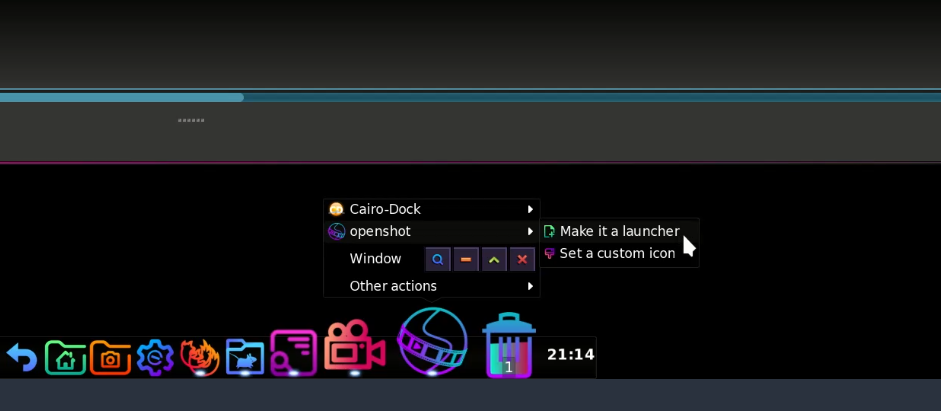
Not sure if this helps anyone but I was quite pleased with myself. To add an app to the cairo Dock. In thus case Darktable.
Open the app
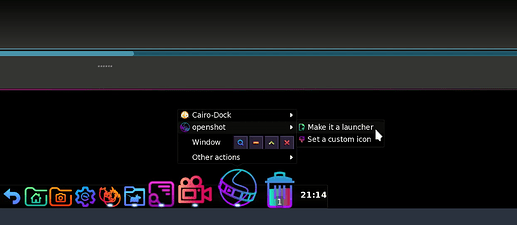
Whilst hovering over the opened app icon in Cairo Dock right click and select create new launcher.
This creates an icon in Cairo Dock which remains after you close the app.
If you restart the computer the app boots up in Cairo Dock.
It maybe common knowledge but it also may help a beginner like myself who wants to know how to add the most commonly used apps to Cairo Dock.
Just installed after a lengthy installation process: elive_3.8.49_beta_hybrid_amd64
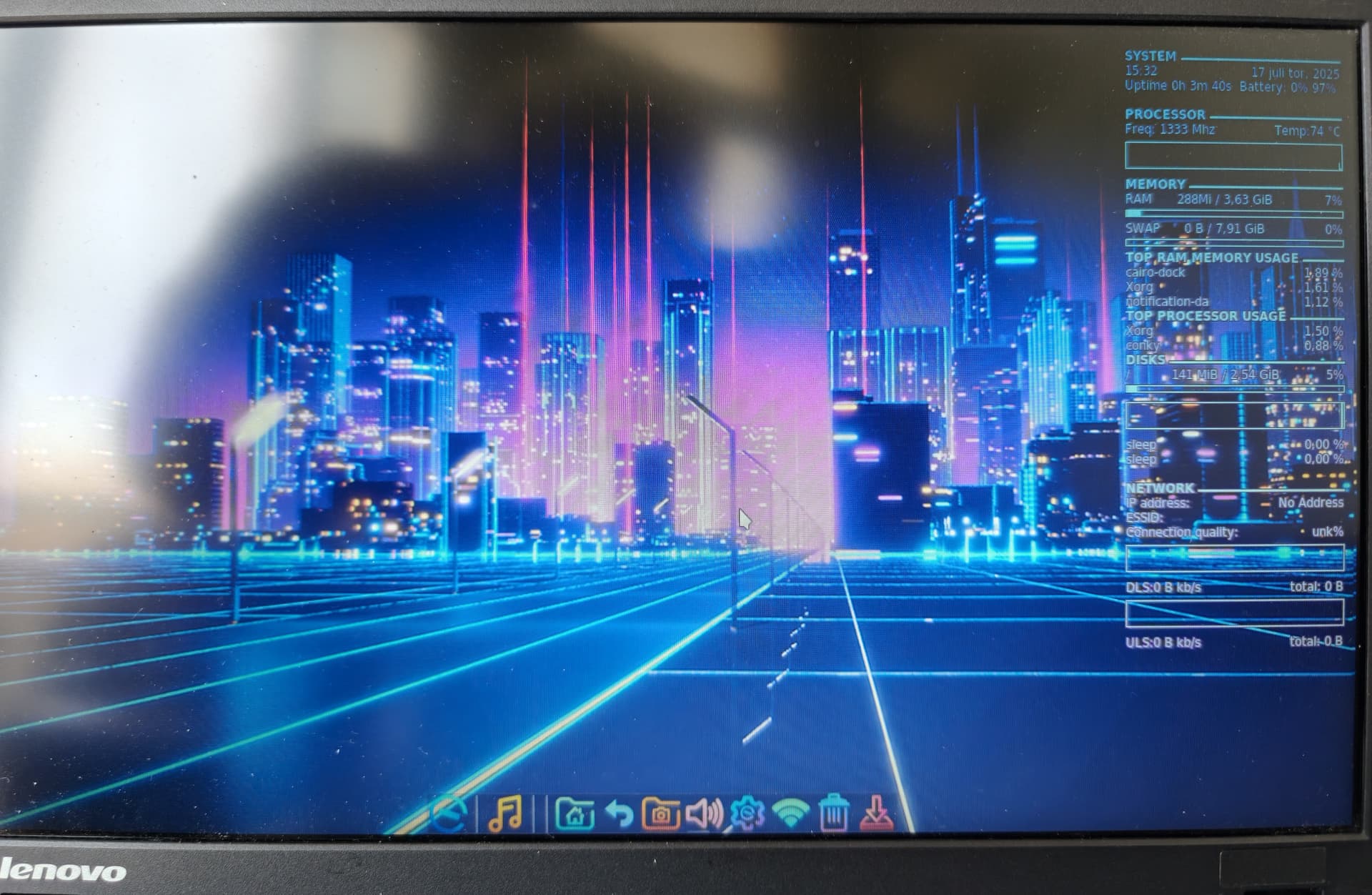
looks beautiful and boot menu open after just 7 seconds (and show the Windows Enterprise that was already there) in an old i3 ThinkPad with only 4Gb RAM and HDD drive. 40 seconds later Elive is up running.
Adding apps to Cairo Dock:
This is one of the things I miss in Elive.
The Cairo Dock will not add any of the apps I have installed.
Instead of adding the app it ads a question mark that does tell it is (Librewolf) but does open nothing at all.
Also Strawberry give a question mark in the Cairo Dock, but does not even mention what it is supposed to be.
Anybody know how to get that to function in the latest Elive?
Thank you for trying. Easy to understand but does not function on Elive_3.8.49_beta_hybrid_amd64. In Cachy and other KDE it does.
Do you know how to get rid of the data on the right side of the monitor?
It does on my machine running an updated 3.8.49 so .... it might be something else, like you wanting to add applications that don't have a sepcific .desktop file in '/usr/share/applications/'
There's a tutorial on customizing E16 here:
Which might have some pointers you need.
That's 'conky'. It gets started every time you open a new session. Simply kill it with "killall -HUP conky" and if you never want it to start: Either remove oit completely with "apr conky" or ....
Just comment out (with #) the line in '.e16/startup-applicattions.list'
Of course you can also see/check-out if E27 is to your liking.
Where again there's a tutorial:
Thank you very much. Highly appreciated.
It is geting late here so will try tomorrow.
A strange thing is that I installed Librewolf from Flatpak (could not find it other place) and though it functions perfect I cannot make it my default browser. When wanting to connect to my default browser I am told I have no browsers installed.
Do not like to share with Google in their Chrome and Palemoon is - strange.
Integrating flatpaks is harder than normal as their paths to the executable tend to differ.
I'm not 100% sure but I think that creating a .desktop link in "/usr/share/applications" should solve that.
Look harder: Installation on Debian based systems – LibreWolf
Which alas, doesn't work as stated.
I suppose it could be gotten to work but installing the appimage or flatpak is easier on the whole.
Neither do I but 'chromium' doesn't have those issues, so that's an option.
Hi again,
installed Elive in my daughters laptop for school - dual boot with Windows - no problem. Updated and upgraded. Installed Librewolf from Bookworm 12 and all was fine could make it a launcher.
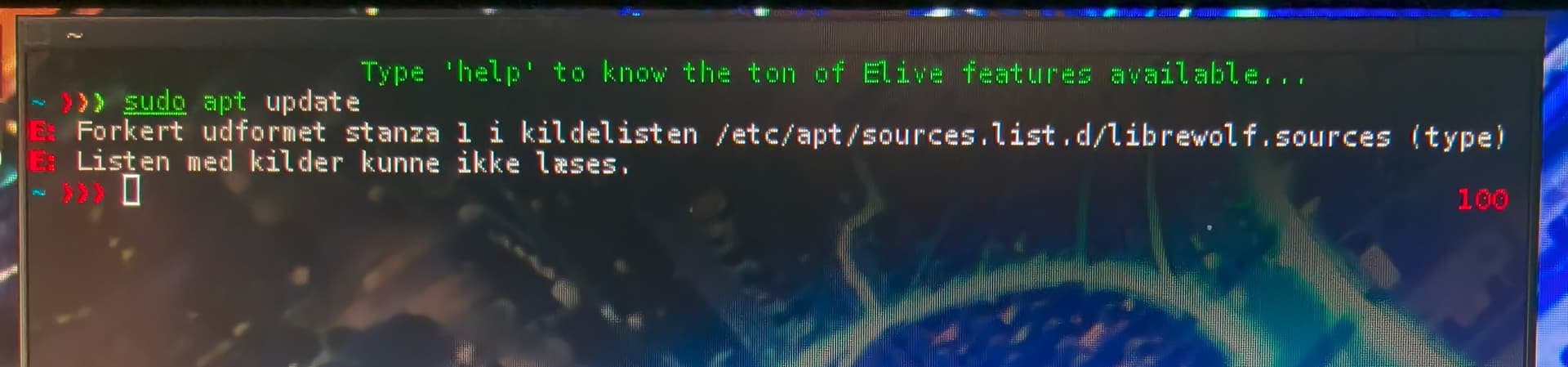
Till after a couple of reboots and a few more installation of apps suddenly terminal did no longer function like normal. All Sudo apt etc. commands were getting the error
It does function on several apps but not all.
Another way to get the apps to be launchers is to find the app launcher in the applications, left click on it and hold and drag it down to the Cairo dock. That is functioning perfect.
I am not Linux expert, but think I found out what the problems for me before have been: Btrfs
Always thought that the new must be better than the old Ext4 but in my 4th install of Elive I made it with Ext4 and everything went smooth.
Have a lot of error and warning messages from installing with btrfs. Want them?
I can install Librewolf (that is a great fork of Firefox, which is no longer acceptable), and all the apps that I am using and that were included in the ISO and were out of date (one of them Audacity very old I replaced with the latest) so Elive is now my favourite Linux and the one I recommend to friends that are now very soon leaving Windows 10.
Are you close to releasing the 3.8.50?
I think the problem was with me using btrfs.
Had several problems and lots of warnings and error messages.
Then made a new install with ext4 and Elive run like a champion.
Does it mean that btrfs is better than ext4?
I am on 3.8.49 and know little enough about Linux to know if I am on 6.12 or 6.11.
I just installed the ISO.
But it runs perfect with ext4 and I can install and remove apps in terminal without issues and have close to all I need except for a client for calendar and email. All the ones I have seen available for Linux are rather long down in quality compared to eMClient use in my work computer and till I find something as good as that plus all the programs paid for (most Affinity and Xara) I will accept all the issues Win11Pro has for work and use Linux for all personal things, banking, browsing, communicating with friends and family etc.
It's a warning that the librewolf,sources aren't what they should be .... solution: remove (or comment out) the line in /etc/apt/sources.list.
I found the librewolf repositories for Debian a total mess i.e neglected and not very trustworthy.
This mess is actually what's keeping me from installing Librewolf over Firefox, for now. If they can't get this straight (even on their own homepage) why should I trust them?
Of course I can always build a package from their Gitlab page but that's beside the point.
Not really other than doing it yourself and almost needless to say:
Something you have backed-up never, ever breaks ..... only the stuff you forgot to backup.
these 3 commands did install Librewolf and not only functioning but also easy to put in cairo-dock and use from there.
Firefox has the idea that audio from the sources firefox wants shall be permitted even if I block the source and save. Next time I look they are still permitted and firefox has been getting strange ideas lately. 5 years and more ago firefox was my go to browser. Now for most searches I use librewolf or torbrowser.
Just installed Elive on an old Windows computer keeping it for dual boot. Did not use btrfs and all went smooth. Even discovery (flatpak gui catalogue) did function so for the user not needed to learn how to use terminal.
Right about the backup. When not doing too many crazy things backup is not needed.
Yes and no, is better, more complex, more features, cp -a works flazing fast because of COW ("bkp snap" features that), it has advanced features... but it can crash and loose all your data, i don't understand why after so many years their recovery / fscks are so bad and so unrecoverable, I had this crash on my system too 2 weeks ago from a system hang because of a special connection in a double monitor that I use now, unable to recover anything before that, I enjoyed 1 year using it without issues, the kernel version is very important for its stability and that's why Elive Stable / Retrowave is going to be released using 6.11 and not 6.12 which is very unreliable with btrfs... btrfs is a "hate or love" filesystem.
At least I used this crash to improve the installer of Elive making it more reliable / secure, its using a double journaling backup and im going to add a third in a raid-like extra partition... to make it more trustable in the limits of what can
final note: if you install using 6.11 or less you should be safe with btrfs but in any case you are the only responsible of your data, pick your better choice for stability




 If they can't get this straight (even on their own homepage) why should I trust them?