The best alternative to SystemD is OpenRC, how much Elive can support it ? - Right now, it's perfectly supported, you can use it. But:
This thread is about using it daily, keeping betatestings and looking for compatibilities, bug reports and solutions, etc. The more correctly integrated, the better.
So if you use it and found issues with it, post here your experience and especially try first to search the solution to the issue, so we can improve Elive with it.
Actual status:
fix for shutdown / suspension / hibernation, etc
elive-upgraded integration
switcher between OpenRC / SystemD
boot messages without garbage
systemd compatibility commands
plymouth compatibility
implement correctly everything in the system / os / packages
update the installer to use the init-switcher (needs betatest of all the compat systemd commands)
Right now the main issues with OpenRC were related to shutdown and suspend as we were talking with @triantares . If im not wrong this issue has been fully resolved right now.
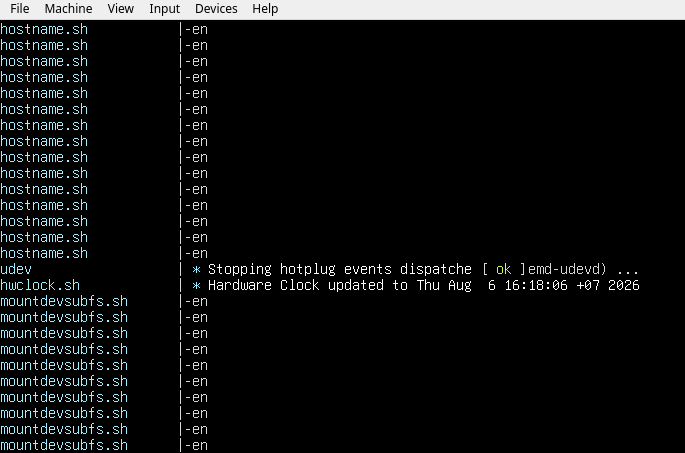
The cause that you see this is not really openrc but the lack of plymouth, the problem basically relies in /bin/sh which points to "dash" (in other words, this is a Debian bug)
So why this happens ?
Init scripts, like from /etc/init.d/ , sources /usr/lib/lsb/init-functions, which defines entries like:
# int log_begin_message (char *message)
log_begin_msg () {
    log_begin_msg_pre "$@"
    if [ -z "${1:-}" ]; then
        return 1
    fi
    echo -n "$@" || true
    log_begin_msg_post "$@"
}
As you can see, there's "echo -n" calls (and "echo -e", etc), which are not compatible with dash, so since dash is the shell used by the /etc/init.d/ scripts and try to call "echo -n" and other ones, it just print the bunch of -en messages, looking ugly
Solutions:
switch sh to bash
You can replace the default /bin/sh to point to bash, by running "dpkg-reconfigure dash" (it doesn't seems to work on my side) or with sudo ln -sf /bin/bash /bin/sh, but this is not an ideal idea, dash is used because is much lighter, and we want to keep lightness
this also replaces the main functions from /usr/lib/lsb/init-functions.d/99-plymouth
fix init-functions
That's the best solution, Elive can provide its own modified version of the init-functions file , where it detects if $SHELL (or similar) is bash or dash and decide which type of echo, printf, or functions to use or even better an overwrriter file in .d dir that will replace the other functions if openrc is installed, something like this (didn't do any tests yet)
Update: im unable to make this working looks like something else than /etc/init.d/ is using echo -e commands, i think openrc migrates them to their system
in any case again: this doesn't affect at all your openrc stability and use
Apparently there isn't a a plymouth alternative but ........ some call this animated in-kernel eye-candy stuff professional: I don't, so I don't really miss the bling-bling and always hit 'Escape' on boot.
It's too M$Windows-like IMO and there's always folks who love to copycat that OS.
What could be nice (not sure if it's do-able) is a nice picture as underlay for the scrolling text
no need escape, just reove hte package or remove the "splash" entry from your grub settings in /etc/default/grub
yes and no, is nice to have... but maybe better as it was in the Elive 3.0 (or it was in 2.0? I don't recall ) - installed system. Which was not plymouth but an EFL app
What could be nice (not sure if it's do-able) is a nice picture as underlay for the scrolling text
Yes, Elive 1.0 or 2.0 had that (which also compiled its own kernels)
systemd-openrc-wrapper: this tool will create all the relative "systemd" commands that a normal OS actually needs, translating these commands to openrc commands, making the system fully compatible for anything that expect to use systemd [VERY EXPERIMENTAL STATE]
init-switcher: an easy way to switch between openrc and systemd, directly on the fly
How to use them:
The wrapper will require the --install parameter, but not needed if you run "init-swither" (it calls it automatically)
The init-switcher tool should be called like:
sudo -E init-switcher openrc -y      # switches to OpenRC
sudo -E init-switcher systemd -y     # switches to SystemD
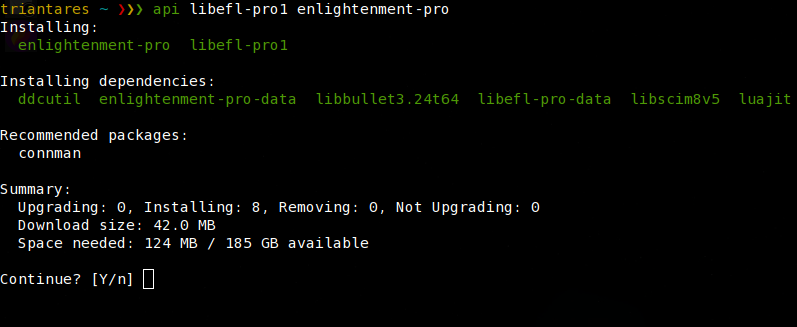
I tried that command but it actually is quite scary to see it removing packages after which the machine turns off.
A new boot up (it doesn't reboot on it's own) shows a systemd system so that's OK by the looks of things.
Interestingly 'flameshot' had issues with button settings during the init-switcher run. Once up and running in systemd I had to reset the settings (there's a pop-up widget) to get it working.
Going from systemd to openrc is a lot faster, where this also shuts down the machine. Other than a reboot during first run (due to plymouth, I don't know why) it boots up just fine. 'dmesg' doesn't show any errors either.
Looks like both work quite well.
The only difference I noticed.
From E16 opting for shutdown shows a brief gksu widget and then goes to lightdm whereas ........
E27 does a straight shutdown from the menu system widget.
Looks like there still is a privilege setting wrong in E16.
turning off is important, if you don't do you risk your data, so yes its a must to do on that moment (which BTW is triggered because of the -y, otherwise not auto, but asking... maybe without -y is a better default to recommend running the command)
bug in flameshot when switching between init systems ?
oh, when switching to openrc, run "sudo openrc" in your next boot to see if you have issues with some daemons, which I think there is ...
interesting... not a privilege, i think its a different of tool to reboot/shutdown
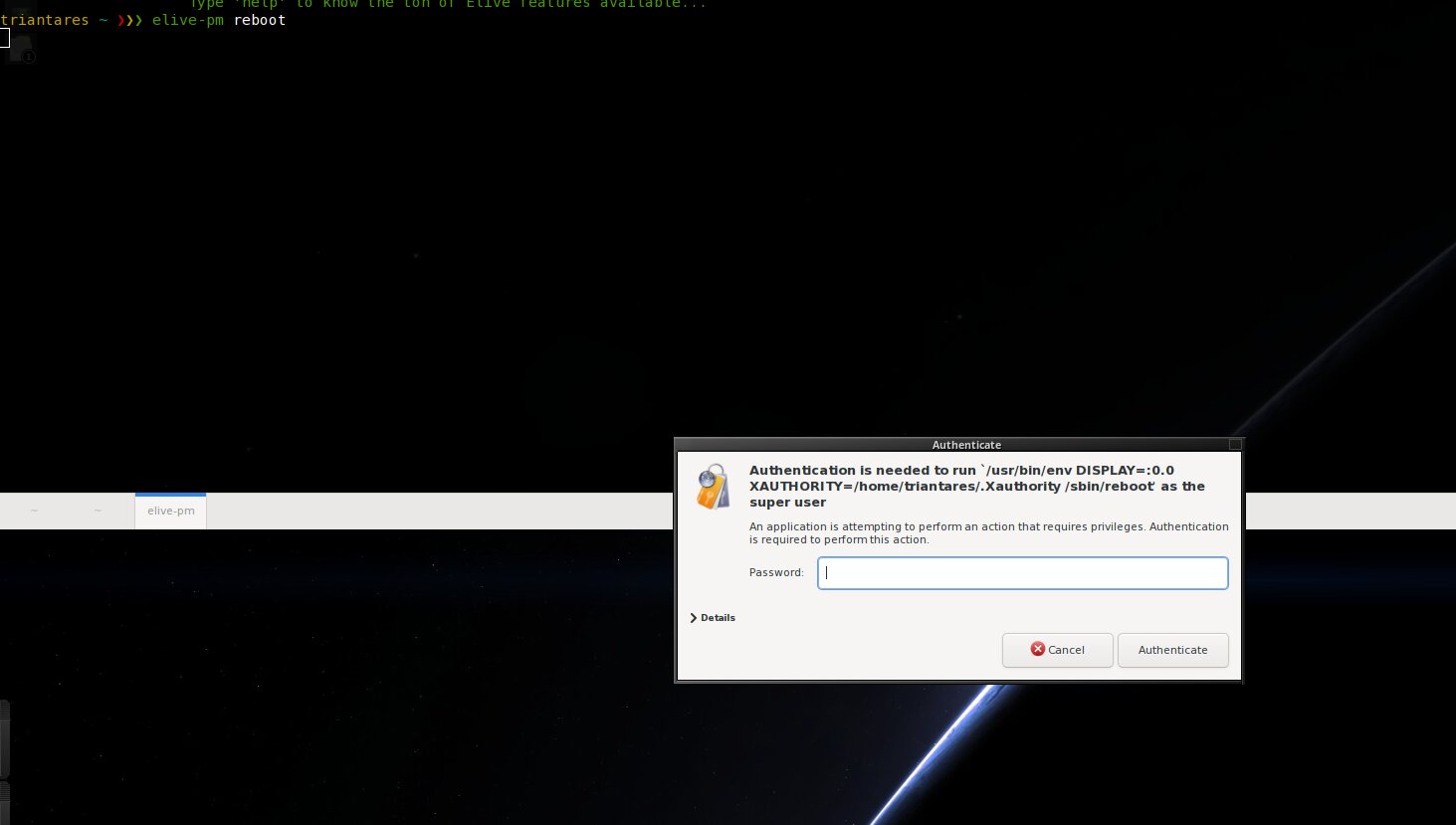
E16 is meant to use "elive-pm shutdown" (make sure to apug for these last fixes), e27 im not sure... but we need to make "elive-pm shutdown" correctly work since its the elive tool.
Probably the issue is because you don't have automated sudo for something, mmmh.... try from a newly created user, this is important because its likely i did a change in the sudo configs for new users in the system that your old user sitill don't have.
On the other hand, the gksu should wait for the user to prompt the password before to leave e16, but i think this can be more like an issue from e16 (running the exec async, instead of waiting for it)
Tip:
sudo su
cp -a /etc /etc.bak-$(date +%F)
# create your new user
# if your new user has it correctly working:
# then compare the /etc/sudoers file and .d directory to see if there's different settings in your new user
Strangely when I tried to capture with a mouse and on a subsequent try a screenshot, neither worked.
Makes me think it was already out of E16 .... or at least the USB keyboard disconnected.
Good idea but ATM I'm upgrading a 3.8.46 machine to 3.8.52 that is using the screen and keyboard.
I make use of broken laptops as Desktop-box replacements.
On the machine I upgraded to 3.8.52 with the (6.12 kernel) on Bookworm. init-switcher fails due to a missing "librc1t64" .... which is part of 'systemd' but apparently not available on the Bookworm version.
Albeit debian.org claims it is in there.
And an update:
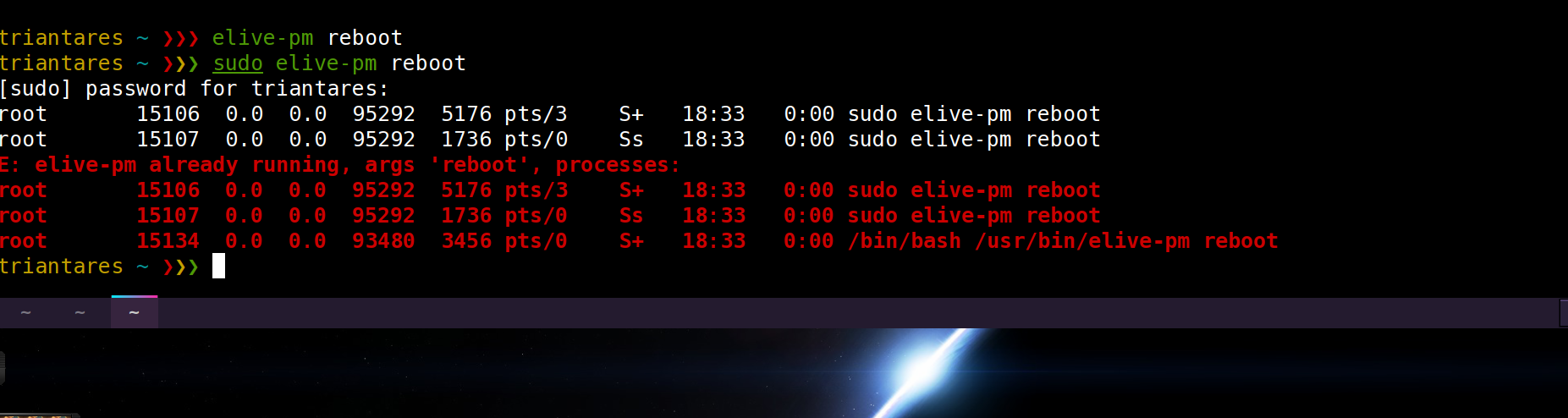
I physically removed the connection between the (broken) laptop screen and the mobo which solves the weird resolution issue with lightdm and tried to betatest upgrade to Trixie againbut ..... 'elive-pm' simply refuses to work.
elive-pm doesn't require / should never be run with sudo, is meant to be run by user
if you add an "set -x" to the tool you can see what the code is doing actually, but basically for this case: it does a reboot only if there's no other processes rebooting or elive-pm already running, seems like you had a ghosted elive-pm ? (check it with ps aux, etc), your machine is a bit strange, so i dont have these issues but i think that the issue can come because you added / created your user without privileges (checkboxes in the user-manager creation), i think thats the culprit of the issue you can experiment with these details by creating new users and trying with them (which of course will use the newer default settings commited in elive)
Yeah, either the one from the betatest upgrade or from trying the menu->system->reboot.
Anyway I just finished the upgrade to 3.8.52 again (this time with the laptop screen disconnected) and 'reboot' works fine.
Just started the betatest upgrade to Trixie and now it all works. ... at least the reboot part did. It's now chugging away, installing and setting up.
Logging out and into E27 .... E27 has retained all my customizations
Firefox has lost it's profile
From E27 menu->sysytem->reboot does reboot the machine straight but .....first goes into the feared black-screen with the blinking - on the top left. A Ctrl,Alt,Delete does reboot and logs into E27.
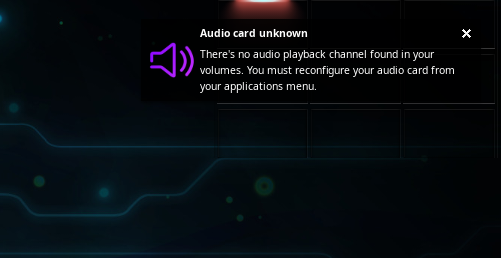
On every E27 login I get the pop-up to choose the sound card and ultimately that it was not found. But sound does work. In E16 there's no message and sound works.
Which, on success, reboots the machine (elive-pm) ..... showing proper text under plymouth on shutting down but does not do that. It shuts down the machine, instead.
After a boot up in systemd again:
Doing (e16|elive-pm) menu->logout->reboot works as it should.
firefox now can find it's profile again.
Bluetooth sound connection has to be setup again in 'pavucontrol', it works though.
E27 has been kept so that only E16 has the customizations that are lost.
Elive-pm in the terminal now works as it should .... it reboots the machine.
Conclusion:
Switching to opnrc is a mess on this machine and 'elive-pm' is still buggy on openrc.
Note that this package provides init-switcher and a tool that makes systemd wrapped commands (use systemd commands into an openrc system, in a compatible way, but not much tested)
Yeah i noticed that, but can be a fallback because the init system changed, nothing really important
yes I saw that too, i don't know what is the cause, didn't tried to google or search info yet
we are talking only about the init-switcher or also the upgrade mode or the re-installation ? because the init-switcher should NOT do all these things:
you can run init-switcher again to systemd and switch between them safely, but use it without the -y option so you can see (and confirm) what is going to install or remove, then verify that is not going to delete your enlightenment packages (of course you need to reinstall them again now first) - about the lightdm autologin same thing: the init-switcher has no reason to do that, but maybe the reinstall or upgrader did (we need to know which step did it) by replacing conf files, make a look to the /etc confs for lightdm to see if they has been modified, maybe you have backups or a backup of /etc.bak-somthing
mmmh again thats not possible from init-switcher (unless uninstalled some packages), that should have been caused by the re-install ?
ok yes, that's because the E16 trigger of elive-pm doesn't wait for it to finish and straight logout the desktop
but more importantly: it should not ask you this prompt, your user should have the right (permissions) to reboot the computer without sudo password, so either:
you created the user without permissions (which checkboxes you selected ? i always enable all of them in my tests)
your system is not well configured to give him these permissions
so the gksu is doing its job for the users that has no permission (thats very good, expected, and well working), but the question is why your user cannot reboot (is this an expected/wanted behaviour?)
I don't think e16 is doing that wrongly, but is a small thing that should be brainstorm with the E16 dev I think
from init-switcher ? ok good... we need to know now "why" can you play again with init-switcher back and forth systemd/openrc as mentioned previously ?
are you running out of free space ? elive has an emergency cleanup of caches and some files if your disk is very low on space, could have been this the cause ? i don't know another reason of this can be - see below
shortly: we should not betatest much e27 yet, i have not finished to implement / integrate it at the moment, it only includes "a setup of hotkeys + a usable theme + startup scripts that are not fully migrated not for trixie nor for e27", the thing about the reboot/shutdown is that I don't even know which triggers uses (system reboots? elive-pm probably not ? systemd commands very likely? but then what when openrc?, etc..)
make a look to your files in /etc/enlightenment/ because its problably using these ones
eventually e27 must use elive-pm (try to set these files to use it), because elive-pm is the trigger that should agnostically accept and manage every environment
this message is from setvolume, run this:
export EL_DEBUG=3
setvolume defaults
if you don't see anything, add an "set -x" at the start of the script and try again, try to catch what is the thing that makes it -think- that audio is not working, so we can fix it (or just paste the set -x contents in a pastebin website so i can analize them and fix, that's more fast)
always forget the first shutdown on switch, you are shutting down a "broken" system to reboot it in the new init system
ok so this basically means that openrc requires you permissions to reboot the machine while in systemd it has these permissions (systemd has its own power commands, and user permissions management), we need to clearly state this issue as if this is what is happening or another thing, + knowing your settings of permissions in user creation time (the checkboxes)
ok wait, that can be because of "browsers on ram" feature, interesting... because it requires systemd, so probably is lefting your profile managed by systemd "orphaned", let me try to fix it...
ok so if you apug and run again init-switcher, it should disable your "browsers on ram" before to switch to openrc, retaining it to work correctly after to boot into openrc (rebuilding, wait 30 min after this post)
But then we still need to implement it correctly for openrc (and this is a requeriment for many other things too), but because of that very specific topic and need, I opened a new thread OpenRC: Daemons run by user
mmh, probably "setvolume" deleted your previous audio card configuration trying to reconfigure it (because it detected that your audio card was not working)
in fact e16 could have been due by the reboot, not sure... make sure to always have backups of e16 and other possible things that you customize, thats very simple by entering in the directory from a terminal and running "bkp save" (note that you cannot change e16 confs on the fly, e16 ignore your manual changes, except for the apps .list and bindings file)
about elive-pm (very explained previously), but I think that we should list well all the bugs in openrc to make it fully compatible working, so let's try to fix the things one to one slowly... read my previous comments and let's progress until theres no more bugs
No this was absolutely only the init-switcher I'm testing here. The upgrade to Trixie went well this time.
I did but you assume too much and that muddles your view.
This is a test of init-switcher on a well configured not-broken Trixie system.
The noted issues (including the removal of 'enlightenment-pro') are only there after using init-switcher to move to openrc.
The issues (ecept the customizations of E16) are resolved after moving back to systemd.
The "brower-on-ram" feature was not activated on any browser.
"elive-pm" issues only exist on openrc not with systemd.
NB.
In relation to testing init-switcher:
This was a systemd system switching to openrc and back.
Working the other way round i.e use init-switcher to go from an existing openrc to systemd might actually give different results.
 im unable to make this working
  looks like something else than /etc/init.d/ is using echo -e commands, i think openrc migrates them to their system
 or remove the "splash" entry from your grub settings in /etc/default/grub


 but i think that the issue can come because you added / created your user without privileges (checkboxes in the user-manager creation), i think thats the culprit of the issue