Thinking of trying to move to Trixie

As the title says. :smiley14:

I'm starting to slowly feel that Bookworm is getting old ..... 3rd party apps, in my case specifically "protonvpn" requires certain python3 libraries that Bookworm doesn't cater for. Trixie does and is considered 'stable debian' now, after all.

Anyway, my 'normal' reaction would be to upgrade to Trixie by simply replacing the Bookworm repositories by Trixie and see how that works out....So I'll be doing that on a , slightly redundant laptop the coming days and see what the result is.

@Thanatermesis I was wondering if there are any very specific pitfalls that I should be wary of and/or maybe stuff I should specifically test, so as to help out in the current workload. :thinking:

2 Likes

Well, keeping it all very short:

A 'full-upgrade' stumbles upon the installation of 'login' which predepends on 'libpam-runtime' which after some searching comes down to the 'bsase-files' package that comes from the elivecd bookworm repo and have priority over the new trixie packages.

Alas elivecd doesn't have a trixie repo yet so that leaves only:

  1. Disable the repo ----- probably a recipe for disaster. :worried:
  2. tamper with the priority settings ---- a whole new can of worms I'm not opening yet. :thinking:
  3. Give up and wait until @Thanatermesis sets up a trixie repo.--- probably the wisest.

Of course, me being me, I went for option 1.
That doesn't look very promising albeit the full-upgrade command didn't show any errors in the beginning. Spoiler: Later on it gets quite messy.

The full-upgrade kept on failing on libgstreamer which ultimately required a disablement of the marillat repos too.
But eventually it actually finished.
Knowing it's not a good idea to mix bookworm and trixie I'll leave those repos disabled for now and see what the trixie base gives for my Elive.

On a sidenote:
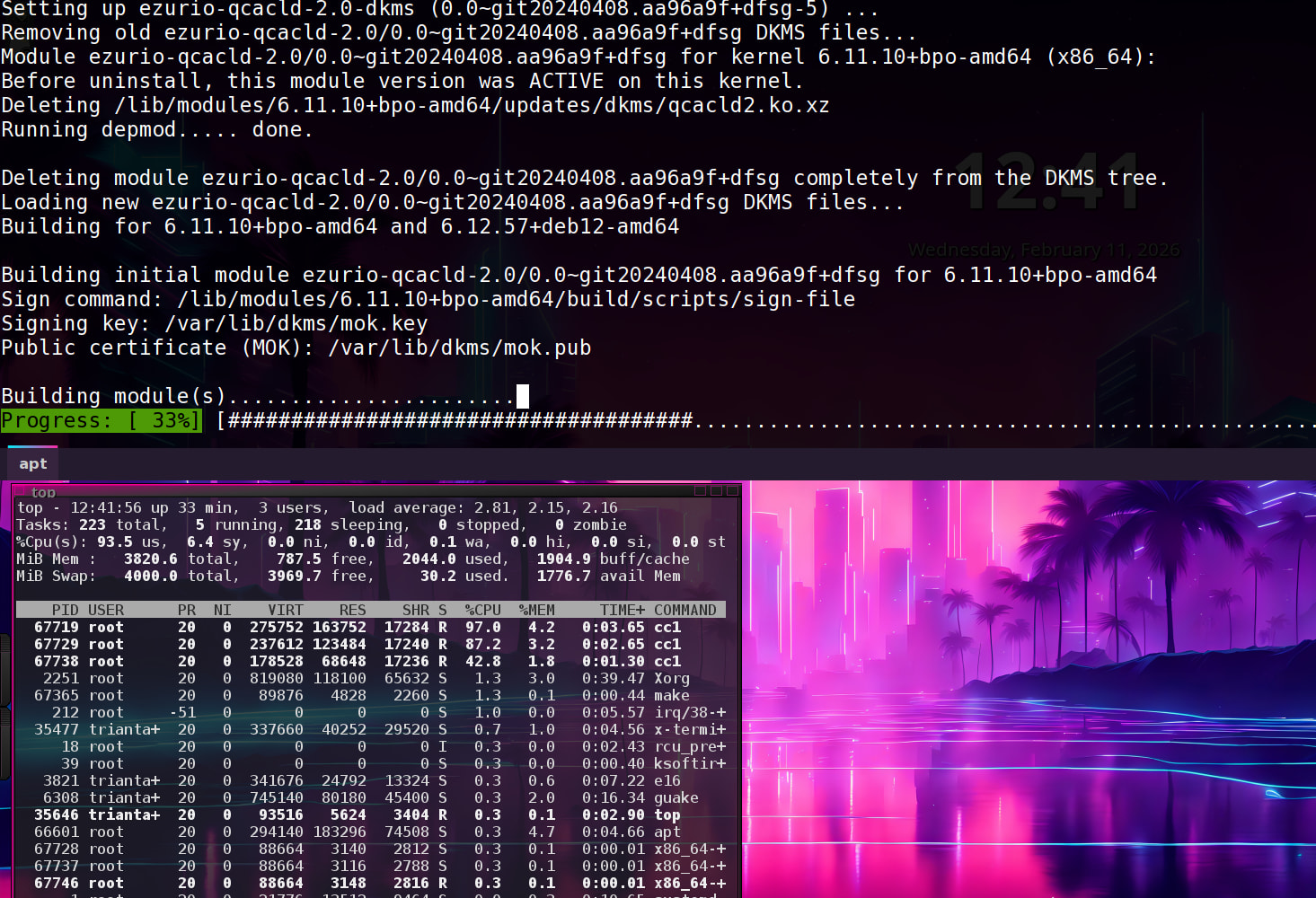
The installation/compilation of 'ezurio-qcacld-2.0-dkms' module keeps on stumbling. This is a module for the qualcom driver (wifi and bluetooth) so removed/uninstalled that because this machine didn't have any qualcom hardware.

Ultimately, after a few hours of upgrading, fixing and upgrading again the result isn't at all bad.

Trixie base works OK with the the existing Elive packages (that are left) and the machine feels responsive and stable.

The way I moved over certainly isn't for the faint of heart. There were 2 or 3 moments where I thought I'd lost the machine but with trickery, did boot up as it should. :shocked:

Just for giggles, here's my (redacted) .zhistory of that action.

: 1770801985:0;cat /etc/elive-version
: 1770808193:0;apug

Update existing bookworm to the latest and then edit the repos.

: 1770808316:0;sudo apt edit-sources
: 1770808382:0;sudo nano /etc/apt/sources.list.d/debian.list
: 1770808434:0;sudo apt update
: 1770808491:0;sudo apt full-upgrade

Which wont start but a minimal upgrade will:

: 1770808606:0;sudo apt upgrade --without-new-pkgs
: 1770809447:0;top
: 1770810004:0;sudo apt upgrade -f --without-new-pkgs
: 1770810924:0;less /var/lib/dkms/ezurio-qcacld-2.0/0.0\~git20240408.aa96a9f+dfsg/build/make.log

Where I run 'top' in a separate terminal to know what's going on. Ending with checking the mentioned ezurio-qcacld make-log for the errors to why it failed.
It kept on failing on every run, wasting my time and CPU cycles before it errors out:

So I removed it as 'login' and 'libpam...' was giving me more troubles.

: 1770811148:0;sudo apt full-upgrade
: 1770811218:0;sudo apt full-upgrade --autoremove
: 1770811260:0;apui libpam-runtime
: 1770811339:0;apui libpam-modules
: 1770812428:0;apt --purge remove ezurio-qcacld-2.0-dkms
: 1770812438:0;sudo apt --purge remove ezurio-qcacld-2.0-dkms
: 1770812502:0;apui -f 

and tried a 'hold' on those packages to no avail:

: 1770813491:0;sudo apt-mark hold libpam-runtime
: 1770813498:0;sudo apt full-upgrade --autoremove
: 1770813528:0;sudo apt-mark hold login
: 1770813535:0;sudo apt full-upgrade --autoremove
: 1770813787:0;sudo apt-get dist-upgrade
: 1770813830:0;dpkg -l 
: 1770813840:0;dpkg -l login
: 1770813854:0;apse login
: 1770813924:0;dpkg -l |grep held
: 1770813987:0;sudo apt install login libpam-runtime libpam-modules

After trying some stuff and finding that the offending 'base-files' were from the elivecd repos

: 1770815934:0;apse login
: 1770816087:0;apt policy login
: 1770816153:0;apt policy libpam-runtime
: 1770816184:0;api libpam-runtime
: 1770816213:0;api libpam-modules
: 1770816234:0;apt policy libc6
: 1770816272:0;apt policy base-files
: 1770816306:0;api base-files
: 1770816328:0;apui base-files
: 1770816355:0;apt-mark showhold
: 1770816399:0;apt policy base-files
: 1770816466:0;sudo nano /etc/apt/sources.list.d/aaa-elive.list

removing (not actually, just setting it to the not yet existing trixie version) aaa-elivelist, allowed the upgrade to continue which then stumbled on 'gstreamer...' packages from the ggg-marillat.list.

: 1770817997:0;sudo apt full-upgrade
: 1770818203:0;apui -f 
: 1770818794:0;startx
: 1770819163:0;sudo apt full-upgrade
: 1770819182:0;apui -f 
: 1770819249:0;sudo nano /etc/apt/sources.list.d/ggg-marillat.list
: 1770819279:0;apu
: 1770819325:0;apui -f 
: 1770820765:0;sudo apt full-upgrade
: 1770820895:0;sudo reboot
: 1770821059:0;apu

And at last the 'full-upgrade' was done. :squinting_face_with_tongue:

2 Likes

Another ting to keep in mind:

I ran this upgrade on a fairly vanilla 3.8.50 Retrowave install.

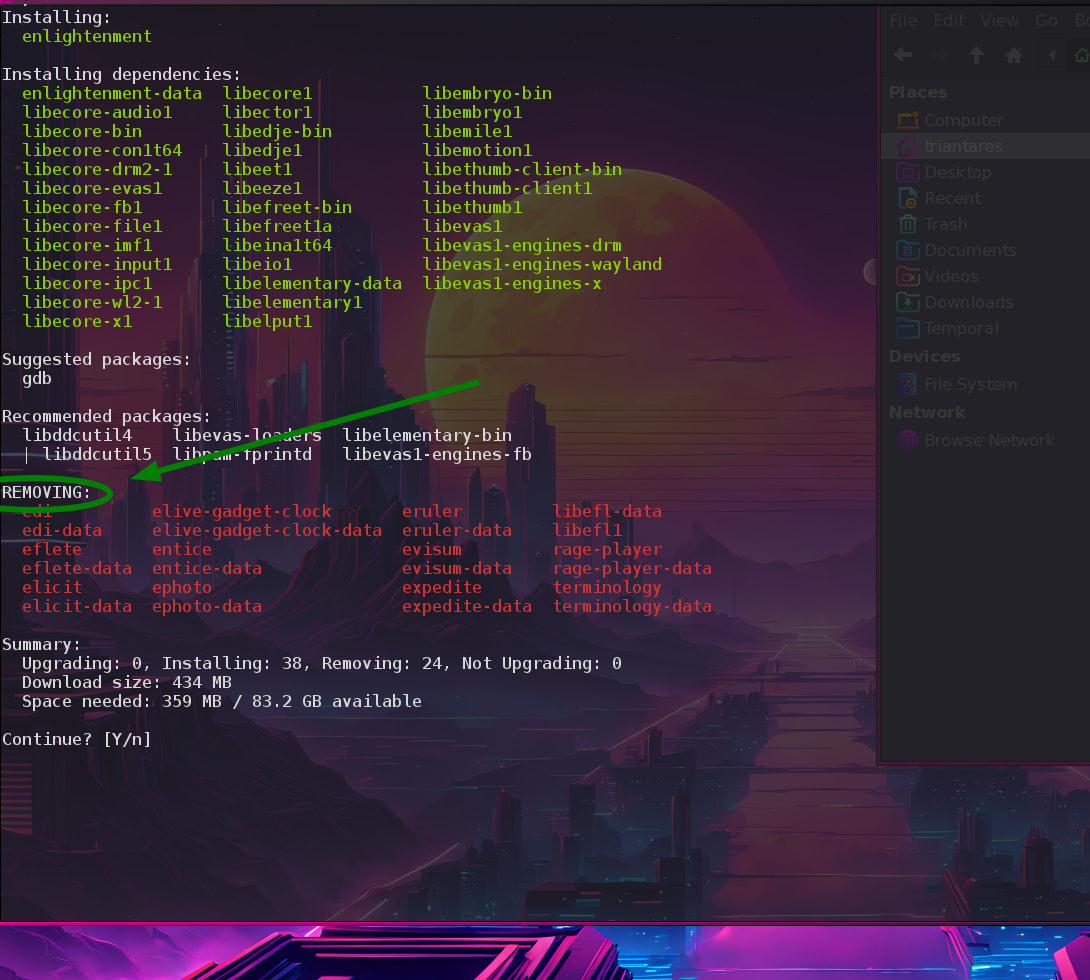
Installing 'enlightenment' will by the looks of things (the missing elivecd repo haunting me) remove most E16 Elive stuff.

And that for it to conk out on conflicting xdg-menu (and probably more)

not really, no work made for trixie yet, so nothing to test

after the packages will start to be migrated to trixie, we can start testing it all, where everything -should- be the same compatible, and then fix the things that are not

note: the work should start this month, if you can wait a little, otherwise expect bugs and uncompabilities by lack of migration

yes i think is the best option, to not lose time and also we cannot consider any reports without this first (similar thing happens with E27+)

Trixie base works OK with the the existing Elive packages (that are left) and the machine feels responsive and stable.

that sounds good, what about resources usage? speed?

the good thing of elive is that a new install will keep the system as it should be :slight_smile: mostly

that procedure looked like a very good apt/dpkg harnessing :squinting_face_with_tongue:

anyways, that and every dpkg/apt conflict should be solved with the trixie repos

ACTUAL PLAN:

2 Likes

It fast and snappy and the touchscreen works better (it's a Thinkpad Helix2 tablet), is my impression.
All in all quite good.

Yeah, it's mostly about conflicting package numbering/naming (unsurprisingly). I didn't check them all so I wouldn't be surprised if most of them don't conflict at all, suspecting they would've been removed by dpkg if they did. :thinking:

I suppose I could setup a trixie repo for elivecd myself and start building new packages against trixie to replace conflicting ones but .... very much doubt if It'll be of any real use to me.

Great, I'm eagerly awaiting this Trixie version. It'll be a real boon for my i7. Thanks for the upgrade.

Specific hardware related stuff is generally done through the kernel (and the firmware) so if you have the impression there's gains to be had .... you could consider upgrading your kernel to the highest level available. :thinking:

TheTtrixie machine (also i7) is running 6.11.5 where my Bookworm machine runs 6.12.57. I'll see what it's got available.
---doing check---
there's a 6.12.69-1 available from 12+1 backports as linux-image-amd64 so I've given it a go but doubt there's a real diff in usage.

Ultimately I moved back to Bookworm.
Too much ado to keep up-to-date with all the missing dependencies for what it (the upgrade) delivers. :innocent: