I'm for the moment leaving this machine in Elive-Trixie "as is" because tablet functionality is hardly there.
So I'm going to experiment with 'touch-egg' (or anything else multi-touch) to get more.
Currently Elive isn't very good in that sector.
Stuff like auto-rotate (or not), on-screen keyboard and multi-touch ...... including emulating middle-click are missing.
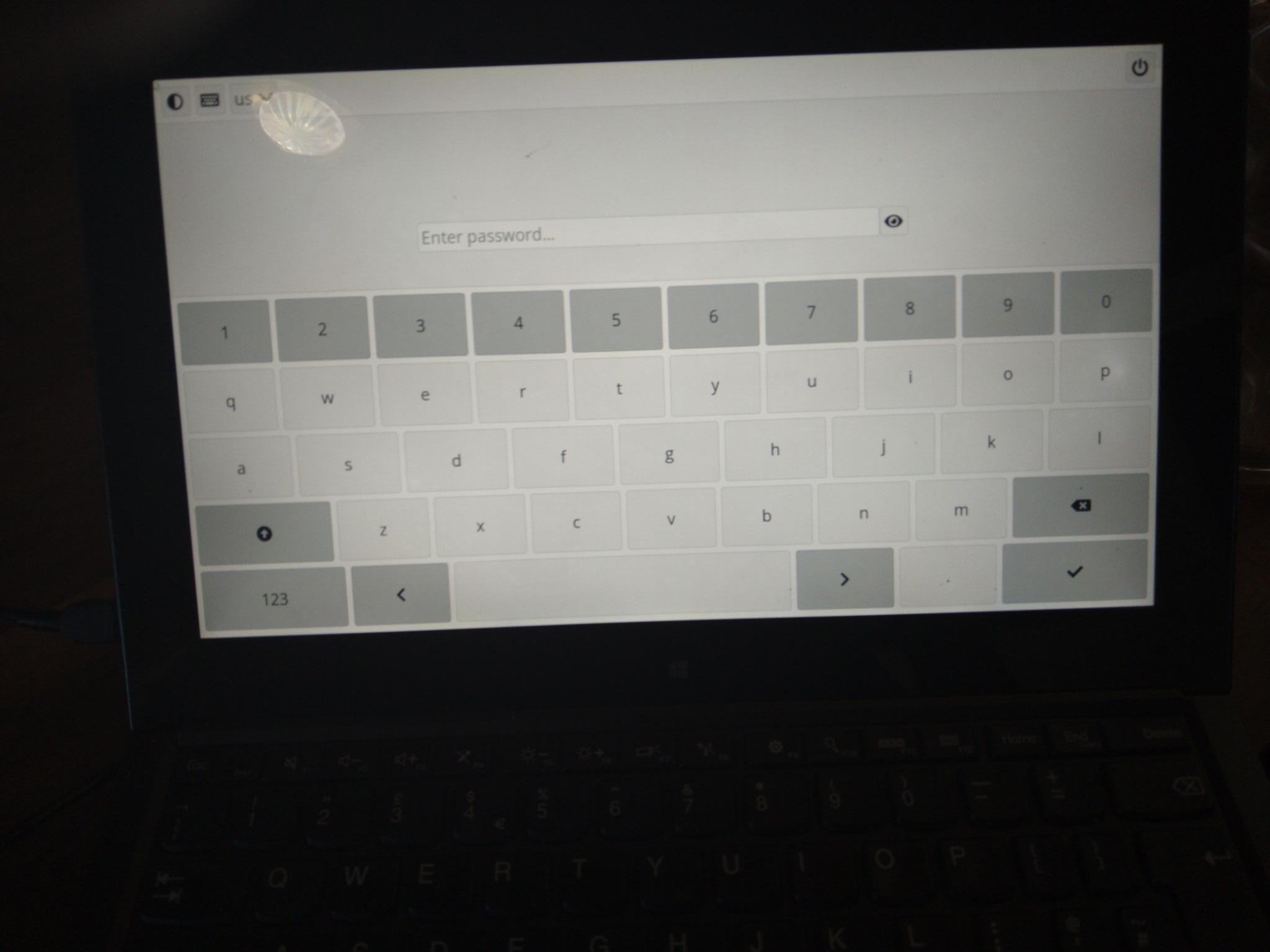
Since it's an encrypted machine an onscreen keyboard for decrypting is also a 'must-have'.
other distros are ? if so, we could see what we can implement in elive / how
that's only possible in E27 (maybe), not in E16, but we are switching anyways so... maybe we can have it
that's not possible, you are inserting the password directly in the console, which doesn't has any "onboard" application available (from what i know, maybe there's one) wrapped by plymouth which is not the graphical system too but only a graphical drawing over console (framebuffer/drm). So the only options I see there is using/configure a different unlock system like using the fingerprint, or to have a keyboard in the console where you can type (there's mouse in the console, i think its included by default in elive, called gpm, so you should be able to use the finger to click in locations of the console... but not sure if gpm recognized touchscreen as mouse directly, you must try that) - in my thinkpad which is touch it recognized it but is wrongly aligned, which is normal because gpm was never been a very reliable mouse feature
Not so much distros but more DEs like Gnome and KDE.
Especially Gnome has some usable stuff for Elive methinks.
As a first line of action, I replaced the already installed 'xserxserver-xorg-input-mutouchver-xorg-input-mutouch' with 'xserver-xorg-input-multitouch' ..... in the sense that installing the latter automically un-installs 'mutouch'.
This works quite well except when using web-browsers like Chrome and/or Firefox, as they have their own multifinger functionality. This sometimes causes the keyboard and touchpad (if connected) to become unresponsive ..... but never the touch-screen, that keeps it's functionality at all times.
I was in E27 on the tablet, i.e wasn't trying in E16.
Anyway, it would seem that 'touch-egg' in combo with 'touche' does give some options there.
E27 not so much yet (or I haven't found them yet) but ultimately, once the list (of what's missing) is complete, we can start pestering Rasterman to add it.
There is some base touchscreen functionality in 'grub2' (i.e the kernel) as you can select with touch in the menu(if grub shows, that is).
Having a virtual keyboard is a whole different story there, I understand. There is some talk of keyfiles being used but that, IMO would make LUKS look stupid and superfluous.....something like auto-login to your encrypted system.
I'll do some more searching on LUKS, when I have a spare moment.
Which I had after showering.
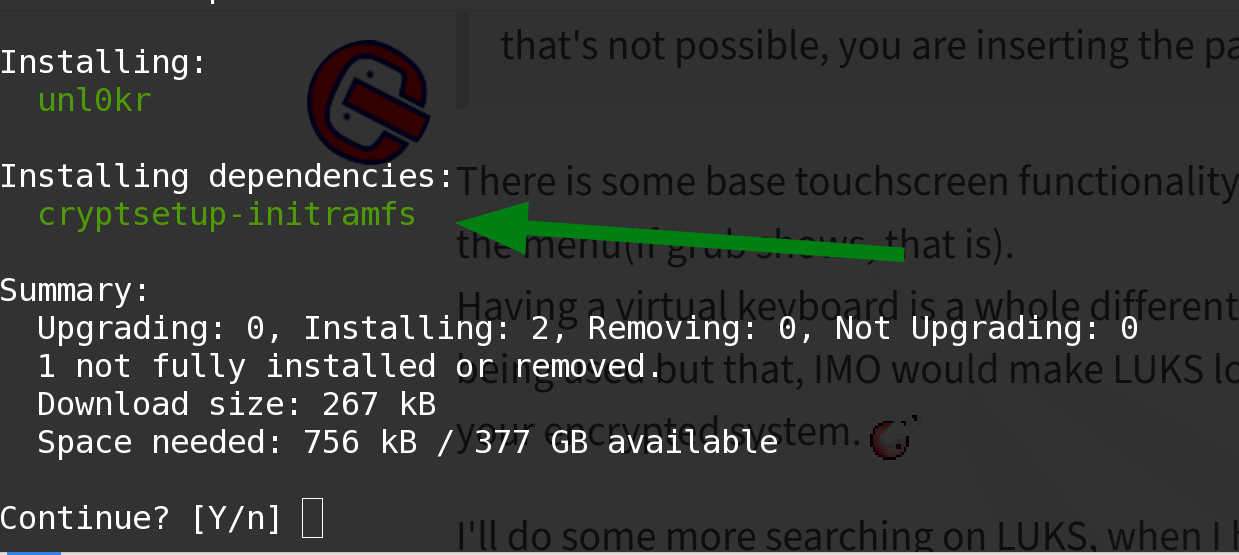
'unl0kr' looks interesting enough and is available in Trixi repos.
I don't have the tablet available ATM so maybe I'll see what it gives tomorrow ( is use my lunch break for that )
It looks promising on the install prompt on my workhorse thinkpad.
Processing triggers for initramfs-tools (0.148.4) ...
update-initramfs: Generating /boot/initrd.img-7.1.3+deb13-amd64
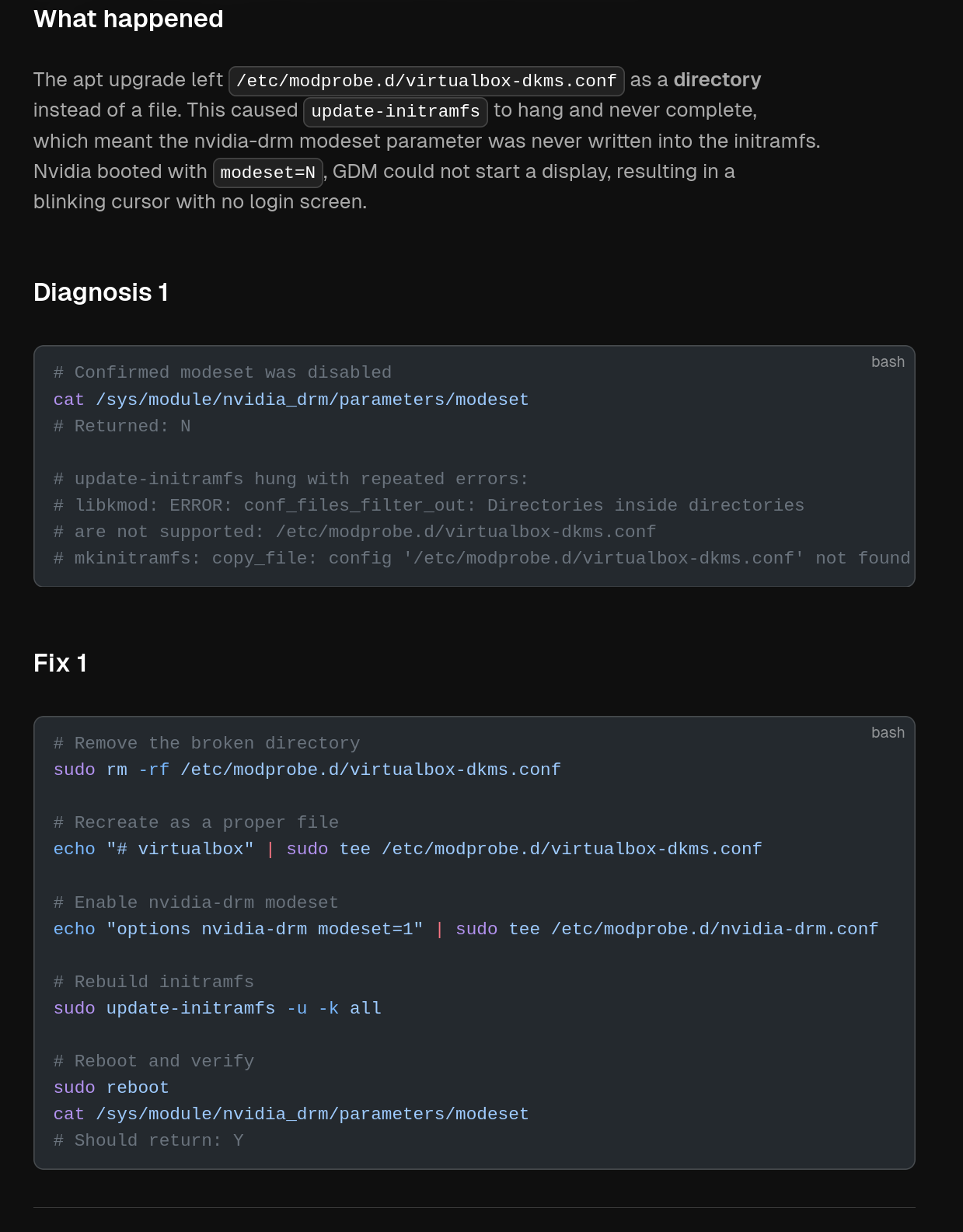
libkmod: ERROR: conf_files_filter_out: Directories inside directories are not supported: /etc/modprobe.d/virtualbox-dkms.conf
libkmod: ERROR: conf_files_filter_out: Directories inside directories are not supported: /etc/modprobe.d/virtualbox-dkms.conf
libkmod: ERROR: conf_files_filter_out: Directories inside directories are not supported: /etc/modprobe.d/virtualbox-dkms.conf
libkmod: ERROR: conf_files_filter_out: Directories inside directories are not supported: /etc/modprobe.d/virtualbox-dkms.conf
I: The initramfs will attempt to resume from /dev/nvme0n1p2
I: (UUID=430db896-16e5-4d27-9134-bebabf2cf6ca)
I: Set the RESUME variable to override this.
libkmod: ERROR: conf_files_filter_out: Directories inside directories are not supported: /etc/modprobe.d/virtualbox-dkms.conf
libkmod: ERROR: conf_files_filter_out: Directories inside directories are not supported: /etc/modprobe.d/virtualbox-dkms.conf
zstd: error 70 : Write error : cannot write block : No space left on device
E: mkinitramfs failure cpio 141
E: mkinitramfs failure zstd -q -9 -T0 70
update-initramfs: failed for /boot/initrd.img-7.1.3+deb13-amd64 with 1.
dpkg: error processing package initramfs-tools (--configure):
 installed initramfs-tools package post-installation script subprocess returned error exit status 1
Errors were encountered while processing:
 initramfs-tools
Error: Sub-process /usr/bin/dpkg returned an error code (1)
This stupid 'virtualbox-dkms' shit is getting on my nerves, I stopped using virtualbox altogether on this machine.
So I removed the abusive file/directory: sudo rm -rf /etc/modprobe.d/virtualbox-dkms.conf
and tried installing 'unl0kr' again but:
I get this"
Summary:
  Upgrading: 0, Installing: 0, Removing: 0, Not Upgrading: 0
  1 not fully installed or removed.
  Space needed: 0 B / 377 GB available
Continue? [Y/n]
Setting up initramfs-tools (0.148.4) ...
update-initramfs: deferring update (trigger activated)
Processing triggers for initramfs-tools (0.148.4) ...
update-initramfs: Generating /boot/initrd.img-7.1.3+deb13-amd64
I: The initramfs will attempt to resume from /dev/nvme0n1p2
I: (UUID=430db896-16e5-4d27-9134-bebabf2cf6ca)
I: Set the RESUME variable to override this.
zstd: error 70 : Write error : cannot write block : No space left on device
E: mkinitramfs failure zstd -q -9 -T0 70
update-initramfs: failed for /boot/initrd.img-7.1.3+deb13-amd64 with 1.
dpkg: error processing package initramfs-tools (--configure):
 installed initramfs-tools package post-installation script subprocess returned error exit status 1
Errors were encountered while processing:
 initramfs-tools
Error: Sub-process /usr/bin/dpkg returned an error code (1)
I tried installing (fixing) unl0kr again but got bitten by the too small boot partition with the 7.1 kernel in it.
Continue? [Y/n]
Setting up initramfs-tools (0.148.4) ...
update-initramfs: deferring update (trigger activated)
Processing triggers for initramfs-tools (0.148.4) ...
update-initramfs: Generating /boot/initrd.img-7.1.3+deb13-amd64
I: The initramfs will attempt to resume from /dev/nvme0n1p2
I: (UUID=430db896-16e5-4d27-9134-bebabf2cf6ca)
I: Set the RESUME variable to override this.
zstd: error 70 : Write error : cannot write block : No space left on device
E: mkinitramfs failure zstd -q -9 -T0 70
update-initramfs: failed for /boot/initrd.img-7.1.3+deb13-amd64 with 1.
dpkg: error processing package initramfs-tools (--configure):
 installed initramfs-tools package post-installation script subprocess returned error exit status 1
Errors were encountered while processing:
 initramfs-tools
Error: Sub-process /usr/bin/dpkg returned an error code (1)
Which isn't that strange:
triantares ~ ❯❯❯ dpkg -l |grep -i linux-image                                                                                                                                                        100
rc  linux-image-6.12.90+deb12.1-amd64                6.12.90-2~bpo12+1                                    amd64        Linux 6.12 for 64-bit PCs (signed)
rc  linux-image-7.0.12+deb13-amd64                   7.0.12-2~bpo13+1                                     amd64        Linux 7.0.12 for 64-bit PCs
ii  linux-image-7.0.13+deb13-amd64                   7.0.13-1~bpo13+1                                     amd64        Linux 7.0.13 for 64-bit PCs
ii  linux-image-7.1.3+deb13-amd64                    7.1.3-1~bpo13+1                                      amd64        Linux 7.1.3 for 64-bit PCs
ii  linux-image-amd64
So some cleaning up is called for.
I got rid of versions 6.12 and 7.0 and the install works.
Alas, I cannot test .... I don't have another encrypted touch-screen machine, running Trixie available ATM.
Mmmh, my thinkpad has also a touchscreen, using the xorg default packages by elive
so you mean that we cannot have both xorg packages installed at the same time ? I use it mostly for chrome (what other uses you do with multitouch?), for me firefox doesn't seems to do any multitouch (no pinch/zoom on it)
note that E27+ has also its own multitouch system recognition that is worth to try (gestures in touchscreens, if im not wrong), check them into the bindings settings
maybe the module is not loaded ? check the E27 settings, there should be a binding / touch one around, also there's some settings to recognize finger sizes or similar things, but i never tried these settings
i don't think so, you removed that broken dir, ok.. but you ran out of space now: zstd: error 70 : Write error : cannot write block : No space left on device
so check the partition /boot size, orphaned files on it, multiple kernels, etc, keep only one
ok so.. if i understood good, this packages makes the user able to have a keyboard to type on boot to unlock the HD, right ?
it is plymouth-compatible too?
note if there's a bug we will need to wait for a future version or to patch it
another importnat thing, elive installs (and autoenables) by default "onboard" in both user logged graphical system and lightdm (from what I recall), we need to make sure that this feature is also included / working by default (an autodetection thing on startup that configures these things for having a kbd)
so which one is the good and which one is the bad ? i assume one is a "newer & better" version of the other but, installing it wont remove other drivers / functionality ?
Yes, you see a short flash of plymouth, then the keyboard and after entering the password, plymouth continues. perfect !!
I sort of doubt whether that will be on short notice.
So, I think we need to make a script (or package) ourselves to remedy that faulty line and ...... to look for the specific (framebuffer) module.
I tried activating 'onboard' in lightdm but that didn't show up. Albeit I didn't look before you mentioned it. BUG??
I tested on the other machine and there 'onboard' doesn't show either.
Have you tested that lately??
Maybe you can test it, as I don't get 'grub' on this machine to go into 'impermutable mode'
No, you assume wrong. They're different drivers.
Same as before: Test it using impermutable.
never, my machine is not recognized as a "machine without keyboard + touchscreen" one, i cannot remove the keyboard on laptop from what I remember this was the trigger
I still not understand how is posbile that you dont have grub showing up
mmh that makes things more difficult, by default all the drivers are installed, so the user can have any hardware and it works... but if needs to install one package that replaces another, that becomes more difficult, like "how to know what is needed the other package?", I assume is not a good idea to replace one with the other globally for all users ?
BTW have you seen that there's an emodule in e27 for screen rotation ? i dont know if you tried it, its on the emodules, called econvertible or similar
no, I mean running it in Trixie or lightdm by starting 'onboard'. The automation is something I've never encountered either.
Neither do I, but it just doesn't show, even when I reconfigure it or when I reinstall it.
I set the time-out to 10 secs too, in case the start-up procedure was too slow.
I don't know actually what it is that makes these packages differ nor do most users require multi-finger functionality unless ----- they've got a touch-screen. So that could be the call to install the multifinger version..
I always found the default touch-screen functionality shitty. Not even just mouse-click emulation, in the sense that double-tap wasn't even recognized to start an application or open a folder. Nor was there right-click or middle-click functionality w.o fiddling in the settings, nor gestures support.
No, I haven't ..... I'm still enjoying the satisfaction of opening LUKS with unl0kr on my tablet.
Rotation (with the Super_button on the tablet or auto- by the built-in gyro) will be the next step after finding out if Trixie killed 'onboard' or not.
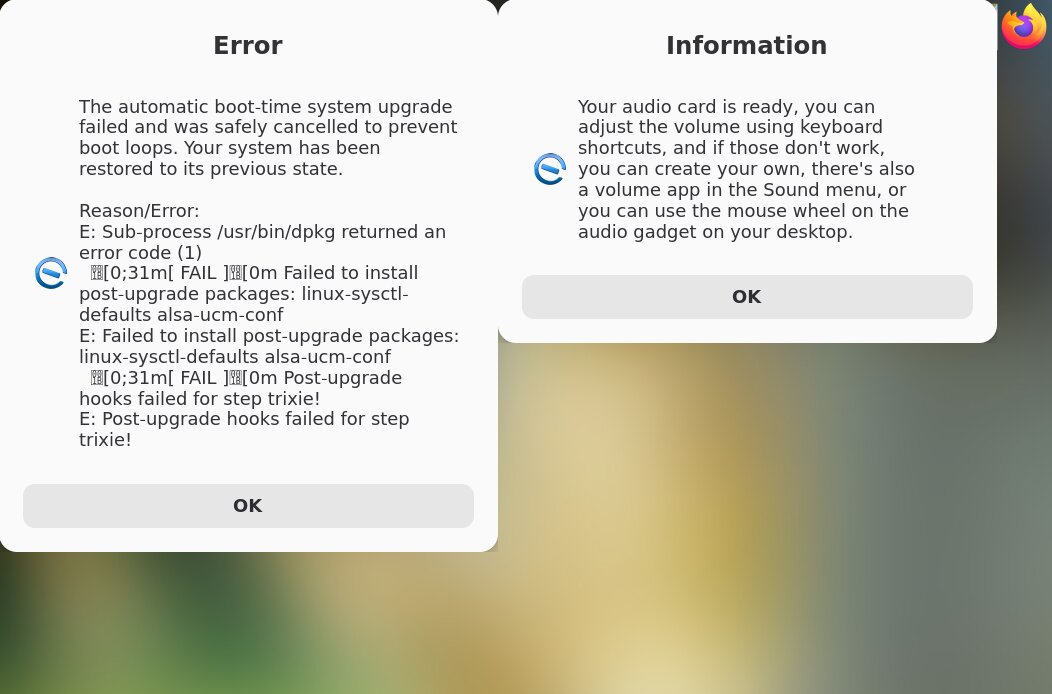
I will try to upgrade betatest a Yoga2.13 this evening and see if that has any issues.
And sound was borked ..... so I let it reboot and saw that there was a 7.1.3 kernel option in grub so I booted that kernel.
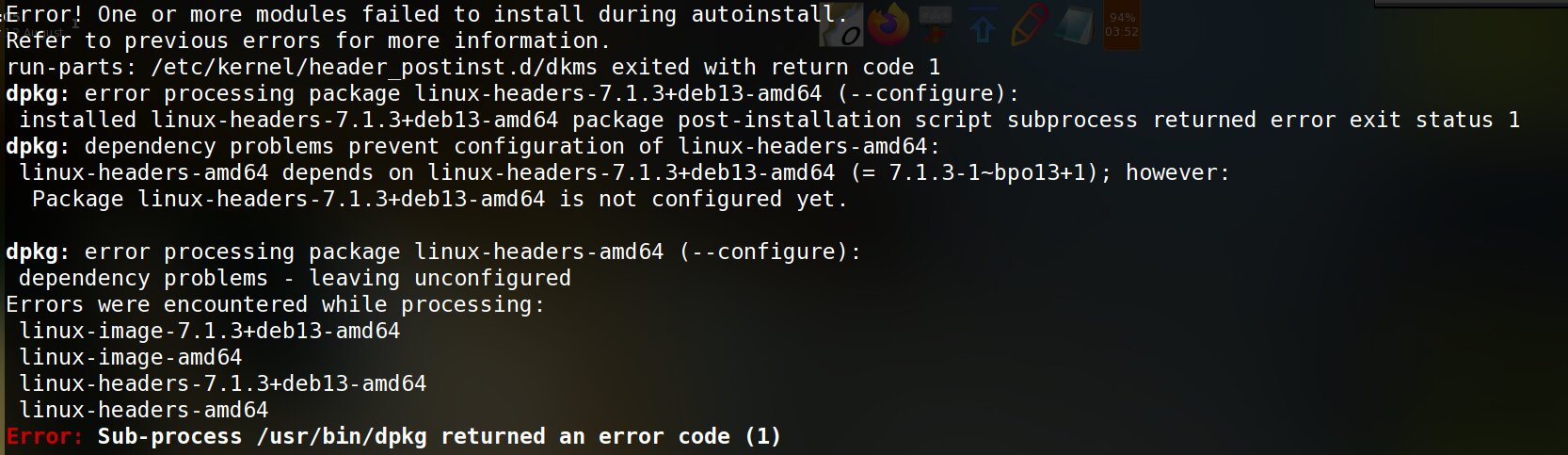
It booted fine and running 'apif' showed 2 packages that were held, one of which was 7.1.13 So I did an 'apug' that used Trixie repos and ended thus:
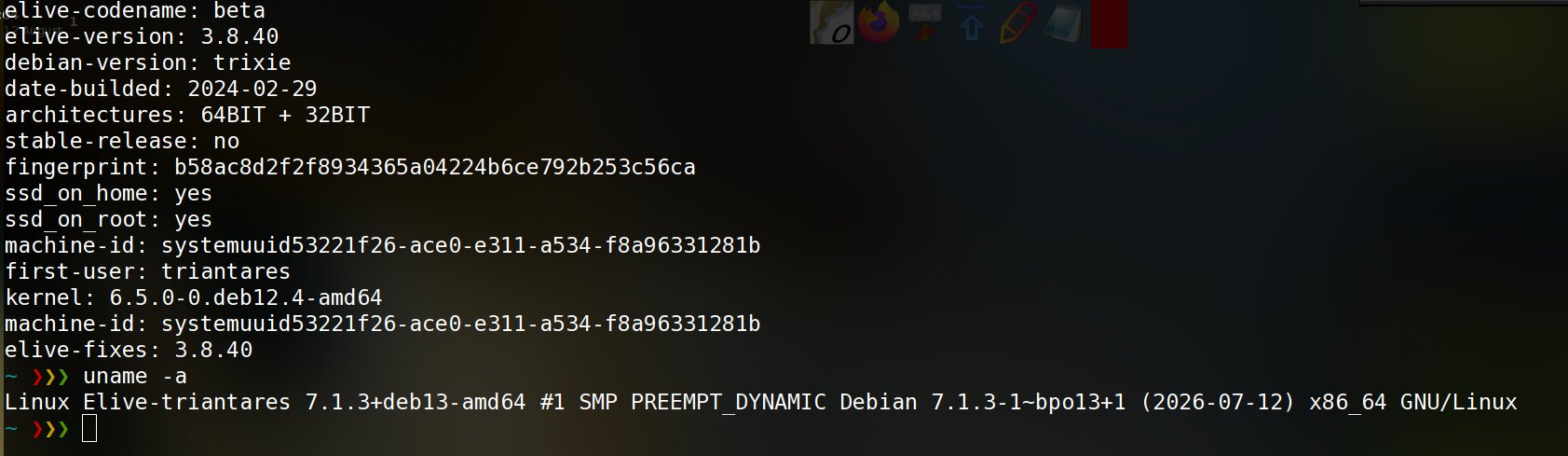
So this is all very strange.
It says I'm running 3.8.40 with 7.1.3 kernel.
The sound card (Intel Comet Lake PCH-LP cAVS) works fine, after the reboot. In relation to 'onboard'
It works when activated by a click, in E16 and in 'lightdm' but it doess not auto-show in either situation when the keyboard is deactivated.
That keyboard deactivation happens when the Yoga is fully folded backwards, I realized.
Even a reboot in folded state does not bring up 'onboard'.
Installing "xserver-xorg-input-multitouch" does not touch 'onboard' functionality, nor does it remove '"xserver-xorg-input-mutouch" like on the Helix2. I do get the impression that multitouch isn't activated and mutouch still being used.
So I removed 'mutouch' but nothing really changes.
Alas I couldn't update-initramfs (yet) as this 7.1.3 kernel thingy keeps conking out there.
Removed, purged and re-installed 7.1.3 and 'update init-ramfs' works fine now ....... and 'onboard' works too.
I loaded that on the yoga but it doesn't do anything there, I'll try on the Helix2 later but have my doubts.
Anyway, I've always disliked auto-rotate (on my phone too) and prefer to add that functionality to the button on the Helix2 (for E16) or an icon (on the Yoga) .... KISS.
I've still got those scripts stashed away somewhere.
As to 'multitouch': Pinch&swipe, etc is there and sort of works depending on the app.
'thunar'(nor 'efm' in e27) does not seem to accept gestures where i.e 'document-viewer' does (important for reading comics on the tablet ).
The browsers (as noted) are also touch capable, as is 'calibre-viewer' in clunky sort of way.
Looks like most of the work will be in getting touch and gestures nicely working and ..... finding a way to accommodate the different tablets and touch-screens out.
I think we should create an elive package (something like 'elive-tablet-touch.deb' to be available for those who want/need an encrypted tablet and extra touch functionality.
After all there wont be that many, if at all and it would be quite "overdone" to have that included by default.
That is a mistake on my side.
It wasn't mutouch that was removed but "xserver-xorg-input-mtrack".
Apparently it isn't compatible with the "-input-multitouch" but will live happily next to "mutouch".
As I hardly see any difference in functionality between "multitouch" and "mutouch".
I reinstalled it and let dpkg remove multitouch.
Alas, it doesn't get "onboard" to show on the Helix2. it errors out on an atspi-ERROR:
AT-SPI: couldn't connect to accessibility bus. Is at-spi-bus-launcher running?
Looks very much like a Gnome thingy to me....but why wont it start in lightdm either?
maybe a bios upgrade, in my side now I dont have my webcam working anymore (why I accepted to update my bios? anyways... I will wait a next update or i will downgrand but yeah its a bit risky to brick) - try to configure your GFX payload settings on grub settings to see if changes anything
I have multitouch from these installed packages (trixie):
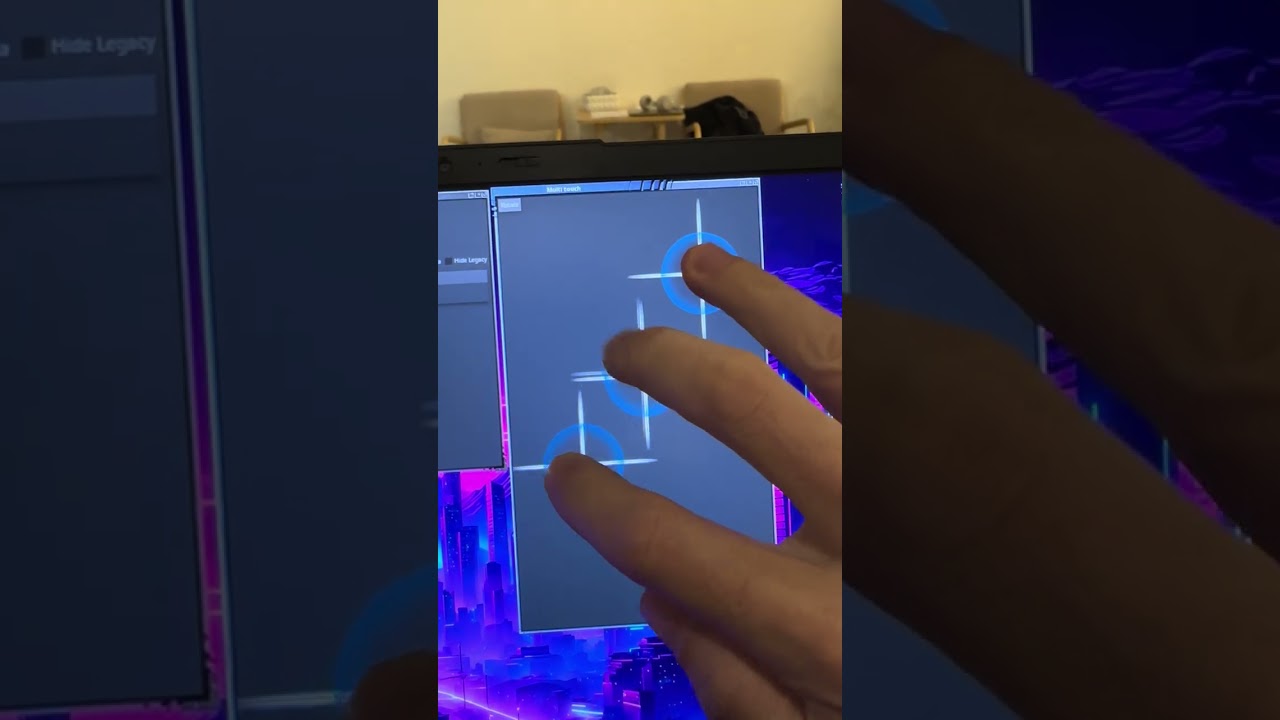
After a little of research, seems like "mtrack" is a better standard / compatible driver, while "multitouch" is more based in the old driver. Is the second one the only that works for you ? try also with elementary_test like in my video
Not sure about the drivers but in E27+ (or more exactly EFL) this is possible, bindings are much more powerful, for example I plan to add an e-module / binding that triggers a double press of the Ctrl key to trigger voice dictation (just like in mac, or older versions of macosx), very handy, not sure if e27 does that but with the possibilities of EFL of course can be. - I tell you this because there's many possibilities that can be implemented in Elive future desktop, our imagination is more limited than the reality, we just need to ask ourselves if "is this really possible?"
you have not strange calibrations of the touch (mouse pointer) on console ?
who cares ? elive always made its own packages in multiple ways & sources of course elive can include back onboard or any other similar app, always did that
yeah... something failed and tried to recover your system, but the recovery feature is NOT tried and may be broken, its a bit difficult to betatest it and require time... but, basically, what failed: you can only know but reading your logs on /var/log/elive-upgrader/ , so make a look to them to see what was the cause of the issue and we can fix it
don't trust a system that is in a broken state / recovery, anything can fail..
but in fact, that message contains info, these packages were unable to be installed, try to install them in your system to see what happens, they are available and installs good ?
this error is a bit strange... you need to analize better your apt results, there should be a problem like:
no space left in /boot while installing kernel, leaving it broken
dependency problem, as it says (why? which one?)
a dkms driver failed to compile, resulting in a broken kernel install (which dkms package was the problematic?)
no, there's no way to detect & trigger that... but EFL / E27 can
first you would need to know if you have the "rotation driver" running and working , if does, then you can know if the emodule is not working or is an undetected hardware. you can also read the source code of the emodule :
seems like this emodule is much more related to tablets (what you are searching for) than what I was thinking - aparently there's a gadget in the desktop that you can enable for it too
not needed, we simply need a way to correctly detect which machines need it and configure it for the installed system (maybe prompt/ask it too)
ignore at-spi, is a very annoying thing that I tried to get rid since long time, it should not appear in fact (but doesn't causes any hurt these messages)
No they both work but 'multitouch' removes 'mtrack', 'mutouch' does not. So it's a no-brainer considering they both have the same functionality.
Yeah, same here.
No, not that I've noticed.
Actually, not really. I was trying to create a rotation script for the button at the side of the screen but ...... 'xev' doesn't even notice it.
I personally actually dislike auto-rotation based on the accelerometer, it gets too quirky if I put the tablet down flat on the table.
I recall having gotten it to work for E16 using an 'xrandr' based script --- but those tablets have long since died.
in short mtrack and multitouch seem to be 2 different forks of the same original code, mtrack is more updated than the other and better supported, sometimes multitouch is needed for some people (apparently you, if i understood correctly?), but mtrack is the one that should be used by default
that's because of bad programmers, is as easy as add a timer of "is on this position for already 3 seconds? then switch" or similar
but i meant, looking at the code it seems like it does multiple things, not only rotation
No you did not (but I'm getting used to that) .... it's about multitouch removing mtrack where mutouch does not.
Yeah, of course it has to consider screen restraints (portrait or landscape) and scaling, especially with apps already running as well as how the mouse (or touch) is oriented, etc.
The point is, same as with my phone: auto-rotate is nice .... until it isn't. Better to have (quick)control yourself if there's a handy hardware button available.
In most cases rotate is handy for graphic orientation of pictures and movies and reading PDFs and/or E-books .... especially comics, where pinch and zoom is a "must have".
I.E: Typing a document or an office application isn't handy at all in portrait mode.
On a side note:
Thunar does not adhere well to multitouch it seems nor does EFM for that matter,, so for tablets we might want to look for an alternative file-manager or ..... customize EFM to the hilt.




 but, installing it wont remove other drivers / functionality ?
 from what I remember this was the trigger