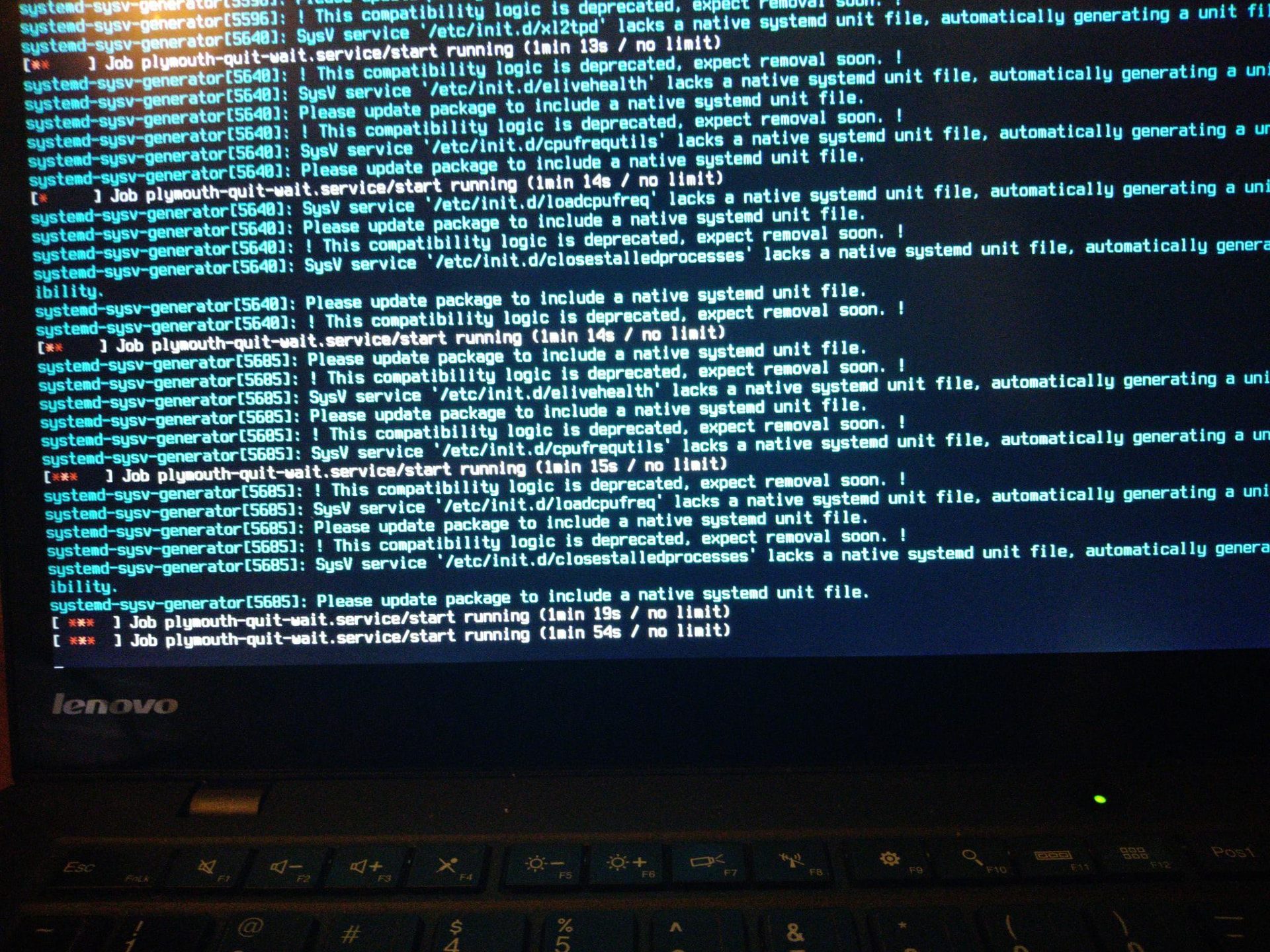
This is the 'very difficult' Helix2 thinkpad that always has had hardware issues, so not really surprised and .... as said it was a 'non-systemd' version.
I don't have access to that machine for at least a week, sorry.
Not quite sure there .... /etc/elive-version' states I'm on Trixie but I have my doubts.'
I very much get that impression but only on first graphical boot. Rebooting from tty1 seems to work for me ........ but tty1 clearly states that plymouth is waiting indefinitely on that first run.
That file is probably not updated if restored from the backup, i dontt know since i have not tested it, you may know on which OS you are basically looking at your installed packages, versions, repos, and /etc/debian_version
Well, a very good important thing to know in these betatestings is if the OS is systemd or not
On the other hand... this is very strange because from what I know, plymouth requires strictly systemd, i think it doesn't work (and basically it doesn't install) without it, so its a strange situation if you are in both
ok, good to know... but now I wonder what is that issue with plymouth, I don't have this issue here in my tests (and seems like it happens to everybody), maybe right now is fixed ? we need somebody doing a new betatesting of distro-upgrade to see if we still have bugs (there was so many fixed while developing the tool)
There's already 2 reboots needed, first from your desktop, to start the upgrade mode, on this step it pre-cache the downloads first, the second one happens after the upgrade has done in console.
Maybe find out why plymouth would want to wait without a time-out, in the first place.
Press F2, F1 or Esc to see the message in console
Anyway I'm running out of machines running bookworm.
mmh i dont have any "real" machine with me to test here (only virtualmachine)
That's what I do and I see a message about "plymouth waiting indefinitely" with no time-out defined.
Alas I cannot find that in any of the logs on any of the machines.
Tomorrow i think I've got some free time so: getting the web-server up again and finding machines with bookworm (in my case always thinkpads)
Allright,
did a trixie-upgrade on a fresh 3.8.50 install and ..........
Boot screen (plymouth) hangs on 3rd (IIRC) and last boot:
Doing 'Escape' to see the console, shows this:
triantares ~ ❯❯❯ apr --purge enlightenment
[sudo] password for triantares:
The following packages were automatically installed and are no longer required:
  ddcutil  enlightenment-conf  enlightenment-data  linux-kbuild-6.11.5+bpo
Use 'sudo apt autoremove' to remove them.

REMOVING:
  enlightenment*  enlightenment-dbgsym*

Summary:
  Upgrading: 0, Installing: 0, Removing: 2, Not Upgrading: 0
  Freed space: 22.3 MB

Continue? [Y/n] n
terminology has it's own package so will remain installed.
but ..... is there a reason you would want to do that? There's no big gain there.
Sorry for the late answer, but i was in lithuania for week.
With the nvidia driver i did the following:
I asked copilot if the 7-Kernel has problems with some nvidia drivers with my rtx 3060. The resoluttion was to install the newest drivers direct from nvidia repostories. So i installed the newest cuda-drivers.
The result was that the 7-kernel booted again in the grafical system (it didn't work anymore after the "old" drivers from the debian repositories if you remember). But it started with the fortune driver and not with nvidia.
I looked in the locks (I let copilot take a look ) and found out, that the fortune-driver was so deep in the system, that it blocked the nvidia driver, because it startet 2 seconds after boot. So i blocked the fortune-driver in the grub loader to give nvidia a chance.
The system booted in the grafical system with nvidia and the 7-kernel. It looked goog and the menus and everything in enlightement worked, but when i started a browser (brave and vivaldi) i only saw the desktop background. You could see with the mousepointer, that a browser is open, but you couldn't see anything but the background.
I also tried it with the 6 kernel, but it was the same the grafical system works but with failures.
Actually i removed the stop from the grub loader and i run the system with the 6.11 kernel and the fortune driver and everything works well.
I need some help. I tried to update my Elive 3.8.52 installation on my laptop. After rebooting, Plymouth loads correctly, but then I get this error. Is it possible to roll back to the previous state of my Elive 3.8.52, or is there a way to fix it? If I download the Elive 3.8.50 ISO, can I repair my system without losing my data? Thanks for your help.
That's what I did: I made a "dirty" reinstall, an upgrade to 3.8.50 with proprietary nvidia drivers over the trixie system (which always froze the pc after i installed boinc and let it work for science...).
After the upgrade i did an apug and after this your echo-command followed by the elive-upgrader.
The upgrade looked good, I had no problems with the place on the harddrive. The system told me that it recognized the nvidia-driver and did some work. If I saw it right, it installed the nvidia 550.xxx from debian trixie.
The upgrade process was really fast only about 15 minutes.
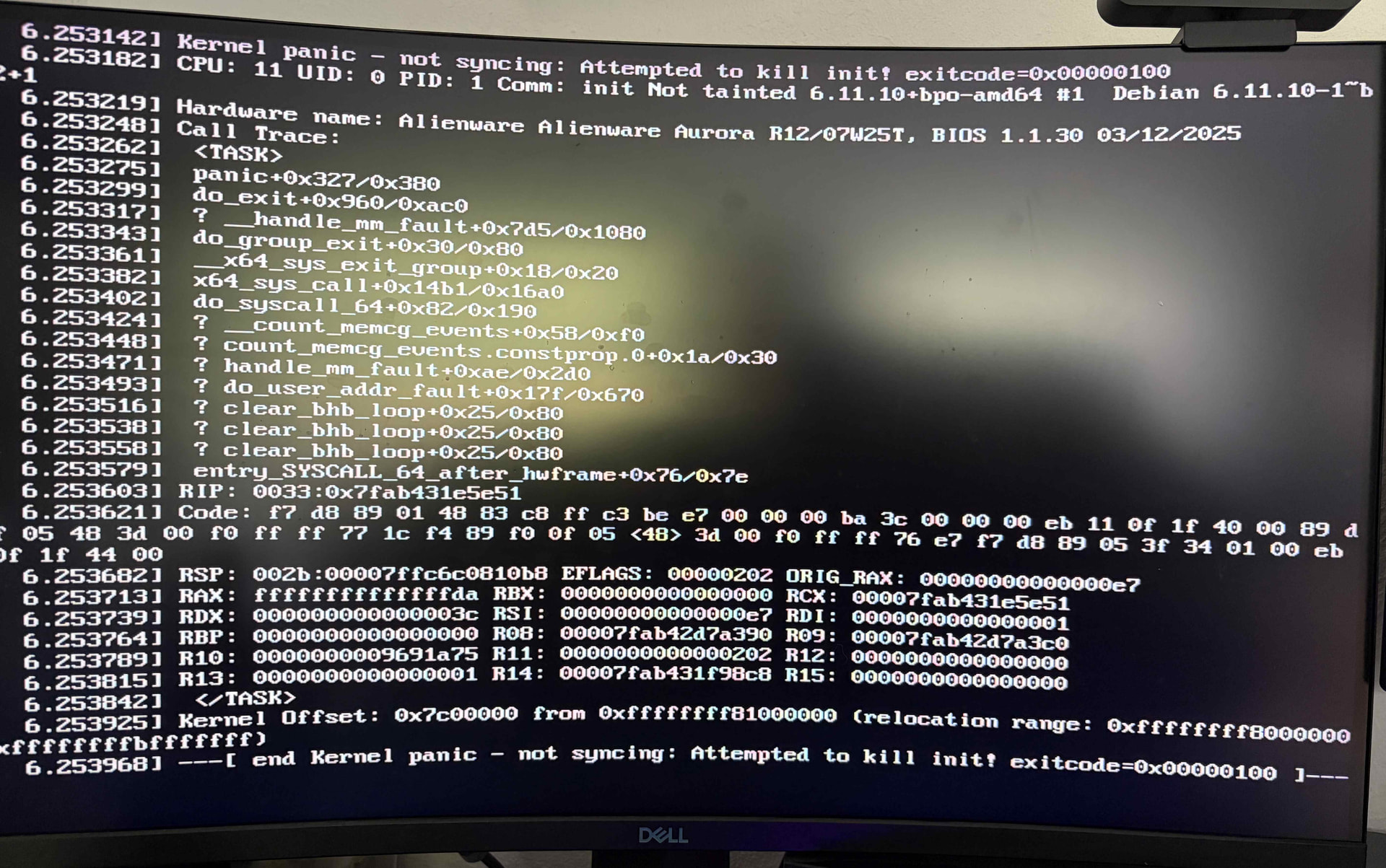
But after finishing and rebooting the kernel panicked as seen in the picture above.
What i also recognized is, that after the upgrade from 3.8.49 to trixie i had both kernels, 7 and 6, in the grub-boot menu and now, after the 3.8.50 upgrade to trixie i only got the menu with the 6.x kernel.
@triki1 yes, the easiest and safest is to reinstall elive 3.8.50 and choose to keep your existing system, it will save your users and data. the system in your screenshot seems to be broken (a broken upgrade state, looks like)
After, you can try the upgrader again, hopefully working this time... if not, try to make a screenshot with your phone to see what/where it failed (if you can see any of these possible errors), it looks like the update of packages is left half-upgraded or something similar.
@earl31515 so if i understood good, you installed 3.8.50, then added the nvidia mark into the conf file:
and then upgrade to trixie from elive-upgrader. Then it updated to trixie AND included the installation of nvidia, that's right ?
If so, I assume you didn't see any error with the nvidia installation process. But it kernel panics on boot, hum... did you tried to boot with the kernel 7 ? also panicks ?
@triantares something stucks your shutdown process (something that is not fully closed, killed, or umounted), it doens't looks to be any of the init scripts of the screenshots... were you using openrc or systemd on that machine ? (I didn't tried enough openrc here)
Yes. That's right. The upgrade worked without errors.
That's one thing I wanted to say. After upgrading from 3.8.50 the kernel 7 was no option in the boot menu. I only had the kernel 7 option in the boot menu after upgrading from 3.8.49.
And I think also @triantares didn't had a kernel 7 option after upgrading from 3.8.50 if i read this thread right.
Ok, this can be due to a dkms package that failed to compile on kernel 7, looking at the logs comparing both isos i removed v4l2loopback which may be the conflicting one. So maybe the next upgrade will not fail installing kernel 7
Question is: does the installer of nvidia was correctly triggered on the upgrade mode ?
Also, remember that you can try to install yourself both the kernel 7 (remove v4l2loopback packages first) and also run the nvidia installer of elive (not the official one, but the one by elive)
I would say yes. I followed the prompt during the installation and it told that the system found the nvidia grafic card and then it installed the newest nvidia drivers from trixie.
That's very good, the upgrade tool will install nvidia drivers too... now the question is: why it didn't worked ? (kernel panic), as said before you can remove the v4l2loopback packages:



 ) and found out, that the fortune-driver was so deep in the system, that it blocked the nvidia driver, because it startet 2 seconds after boot. So i blocked the fortune-driver in the grub loader to give nvidia a chance.